Get Your ChatGPT & OpenAI Invoices — Automatically
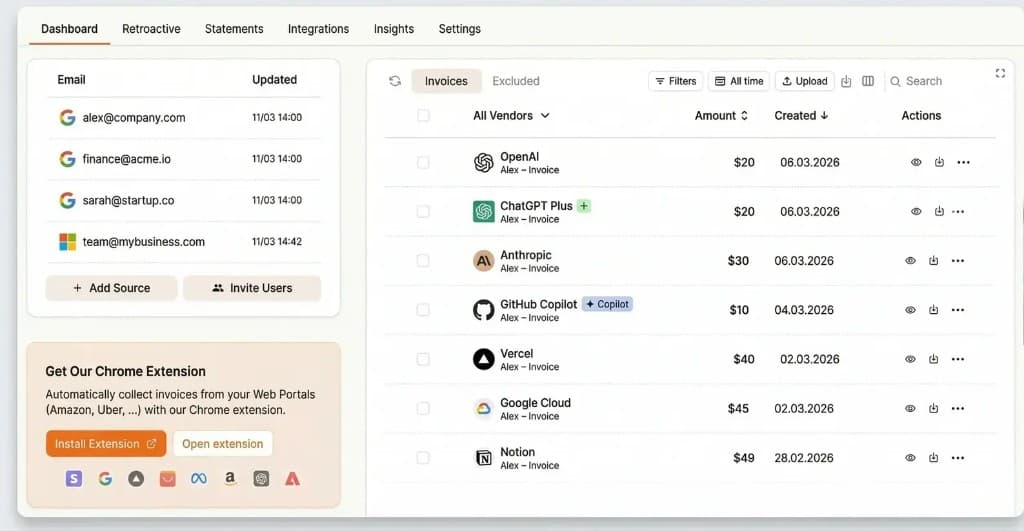
Download ChatGPT Plus and OpenAI API invoices manually in minutes, or connect Tailride and collect all receipts on autopilot — organized and ready for your accountant.
First 10 invoices free · Plans from $13/month · No credit card required


How to Download ChatGPT Invoices (Step-by-Step)
Pick your plan below — or skip the manual work entirely with Tailride
Go to chatgpt.com and sign in to your Plus account.
Click your profile icon in the bottom-left corner of the sidebar.
Navigate to Settings, then select Account.
Under Account, click Payment then hit Manage to open the Stripe customer portal.
In the Stripe portal, find Invoice history and click the PDF icon next to any charge.
Tailride connects to your inbox and collects every ChatGPT receipt automatically — no portal visits needed.
Try Free →Log in to platform.openai.com with your API credentials.
In the left sidebar go to Settings → Billing → Billing history and download the PDF for any charge.
Managing multiple orgs, projects, or variable usage costs? See our full guide: OpenAI API Invoice Guide →
Managing multiple orgs, usage limits, or spend alerts? Our dedicated OpenAI API guide covers it all.
OpenAI API Invoice Guide →Go to chatgpt.com and sign in with your admin account.
Click your workspace name in the bottom-left, then select Settings.
In the settings panel, click Billing in the left navigation.
Click the Invoices tab to view and download past invoices directly. Alternatively, click Manage plan to open the Stripe portal.
In the Stripe portal, locate Invoice history and download PDFs for any billing period.
Only workspace admins can access Team billing. If you’re not an admin, ask your workspace owner to download invoices or grant billing access.
Try Free →Prefer to watch? Here's a quick walkthrough:
ChatGPT & OpenAI Billing — What You Need to Know
Key facts for finance teams, freelancers, and anyone expensing AI subscriptions
Who Needs This
Freelancers, agencies, SaaS teams, and businesses expensing ChatGPT Plus subscriptions or OpenAI API usage — anyone who needs monthly PDF invoices for accounting or VAT reclaim.
Who Issues the Invoice
US customers: OpenAI, L.L.C. (San Francisco, CA). EU customers: OpenAI Ireland Ltd (Dublin) — VAT-compliant invoices with your VAT number included.
Common Pain Points
ChatGPT Plus and OpenAI API are two separate billing systems, each with its own portal. Most businesses need invoices from both — there’s no combined export built in.
Regional Differences
EU businesses receive invoices from OpenAI Ireland Ltd and can add their VAT number for zero-rated supply. UK businesses receive separate invoices with UK VAT at 20% applied.
Manual Download vs Tailride Automation
See why hundreds of teams have switched to automatic invoice collection
🗺️ Portal Navigation Tips
- ChatGPT Plus: chatgpt.com → profile → Settings → Account → Payment → Manage
- OpenAI API: platform.openai.com → Settings → Billing → Billing history
- ChatGPT Team: Admin only — workspace Settings → Billing → Manage subscription
- Can’t find Manage subscription? Look for “Upgrade plan” — that’s the same portal entry point
- EU VAT number: Add it in the Stripe billing portal under “Billing information” before downloading
- API invoices missing? Check that you’re logged into the correct OpenAI org — API orgs are separate from ChatGPT accounts
✅ Pre-Download Checklist
- Confirm you have admin/billing access to the relevant portal
- Decide if you need ChatGPT Plus invoices, API invoices, or both
- For EU: add your VAT number in the Stripe portal before downloading
- Note the billing period — OpenAI bills monthly on your signup date
- Check both portals if your company uses ChatGPT Plus AND API
- Verify the invoice entity: OpenAI LLC (US) or OpenAI Ireland Ltd (EU/UK)
- Save invoices in a consistent naming format for your accountant
How ChatGPT Invoice Collection Works
Set up once, collect every ChatGPT & OpenAI invoice · See all scanning capabilities →
Connect Your Email
Securely connect your Gmail, Outlook, or IMAP email in under 2 minutes. Your emails stay in your inbox — we only read billing confirmations from OpenAI.
AI Monitors 24/7
Our AI continuously scans your inbox for ChatGPT Plus and OpenAI API receipts in any format — PDF attachments or text-embedded billing emails.
Automatic Extraction
Invoice data is extracted instantly and organized in your dashboard — ready for accounting, CSV/PDF export, or forwarding to your accountant.
Why Choose Tailride for ChatGPT Invoice Collection?
The most reliable automated invoice detection for ChatGPT Plus and OpenAI API
All Email Providers
Gmail, Outlook, Yahoo, IMAP — wherever OpenAI sends billing confirmations.
Hourly Processing
Invoices detected and processed every hour — no waiting, no manual checks.
Unified Dashboard
ChatGPT Plus and OpenAI API invoices in one place — no portal switching.
Smart Extraction
Handles PDFs, images, and email body text — even inline invoice data.
VAT Ready
Captures OpenAI Ireland Ltd (EU) and OpenAI LLC (US) invoices — VAT fields included.
99%+ Accuracy
Every ChatGPT and OpenAI API invoice captured, every field extracted correctly.
Got your ChatGPT invoices?
Now reconcile them.
Once Tailride collects your ChatGPT and OpenAI invoices, automatically match them against your bank or credit card statement — no manual cross-checking, no missed charges.
Try Bank Reconciliation FreeWhat Our Users Say
Businesses of all sizes use Tailride to stop chasing invoices
“I just wanted to congratulate you on how ridiculously well Tailride works. Super clean, super straightforward to solve the problem… Great.”
“We were forwarding invoices around like it was 2010. Half the time they got missed. Tailride plugged right into our inboxes and gave us proper visibility.”
“Very, very pleasantly surprised. Has completely revolutionised capture of incoming invoices. So simple and works a treat right out of the box.”
“If you want to completely forget about invoices, you’ll need Tailride. An app that connects natively to your inbox and finds all invoices for you.”
“Fantastic tool to bring order to the chaos of invoices. Absolutely mandatory for fast-growing companies — our accountant’s the happiest now!”
“Tailride is a really great tool. The interface is super clean and minimalistic. I’ve uploaded over 100 purchase and expense invoices already.”
Specialized Scanning Tools
Purpose-built tools for every email scenario · View all 50+ tools →
Gmail Invoice Scanner
Extract invoices from PDF attachments in Gmail with G Suite integration
Try this tool →Email Body Extraction
Extract invoices from email body text, HTML tables & inline receipts
Try this tool →Frequently Asked Questions
Everything you need to know about ChatGPT & OpenAI invoices
Start Collecting ChatGPT Invoices Today
Join thousands of teams who never log into a billing portal again — Tailride does it automatically
No credit card required · First 10 invoices free · Cancel anytime
